39g Wireless Gaming Mouse: 42K DPI & 8K Polling
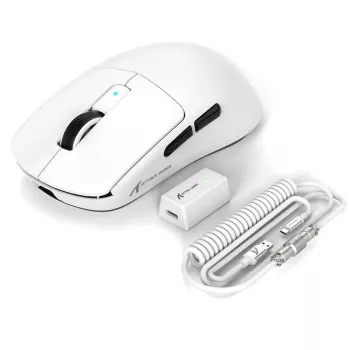
Ultra-Light 39G Wireless Gaming Mouse with 42K DPI and 8K Polling Rate
An ultra-light wireless mouse can change how fast and consistently aim adjustments happen, especially in flick-heavy shooters and tracking-focused games. This model pairs a 39 g shell with a high-resolution sensor (up to 42K DPI) and an 8K polling option designed to reduce input reporting delay and improve feel during rapid micro-corrections. If your current setup feels “floaty” on stops or slow to re-center after a flick, dropping weight while keeping strong wireless performance can make every motion feel more direct.
What makes an ultra-light mouse feel faster
Speed in-game isn’t only about raw DPI—how quickly you can start, stop, and change direction matters just as much. Ultra-light designs target that mechanical side of aiming.
- Low mass reduces inertia, making starts/stops and direction changes easier during quick flicks and short strafes.
- Less weight can lower fatigue in long sessions, particularly for low-sensitivity players who move the mouse farther.
- Control still depends on glide and stability: skate quality, pad texture, and a secure grip help ultra-light feel smooth rather than twitchy.
Key specs at a glance
This mouse is built around a few performance levers that competitive players tend to notice immediately: low weight, frequent input updates, and wide sensor tuning range.
- Ultra-light build centered on a 39 g target for quick handling.
- Wireless play with a high polling option up to 8K for frequent position updates.
- Up to 42,000 DPI ceiling for flexibility across different monitors and play styles.
Feature summary
| Feature | What it means in play |
|---|---|
| 39 g class weight | Easier rapid flicks, quicker stops, reduced wrist/forearm fatigue |
| Up to 42K DPI sensor setting | Wide sensitivity range; typically best used to dial in a comfortable eDPI rather than maxing out |
| Up to 8K polling rate | More frequent reports to the PC; can improve perceived responsiveness on compatible setups |
| Wireless connection | Cleaner desk movement and fewer cable snags; performance depends on stable RF environment |
| In-stock availability | Ready to ship when listed as available |
DPI, sensitivity, and practical tuning
DPI is simply the mouse’s counts-per-inch setting. A higher number expands the available range, but it doesn’t automatically improve aim. What tends to matter most is repeatability: the same hand motion should produce the same on-screen rotation every time.
- Choose a DPI that supports comfortable in-game sensitivity. Many players prefer settings that keep in-game sliders out of extreme ends, then fine-tune in small increments.
- Beware of “too high” DPI for your control. Very high DPI can magnify tiny hand tremors on some setups; lowering DPI slightly and adjusting in-game sensitivity often feels steadier.
- Desktop vs. in-game needs can differ. On multi-monitor or high-resolution displays, moderate-to-high DPI can make desktop navigation snappy without forcing a high in-game sensitivity.
8K polling rate: when it helps and what to check
Polling rate is how often the mouse reports its position to your PC. At 8K, that’s up to 8,000 reports per second. In the broader input chain, higher polling can reduce the time between a physical movement and the PC receiving that movement, which can improve “connected” feel—especially when everything else is fast enough to keep up.
- Where it’s most noticeable: high-FPS play where your system and monitor can capitalize on frequent updates (often 240 Hz+ displays).
- CPU overhead is real: some systems can experience higher processing load; if you see stutters or frame-time spikes, dropping to 2K or 1K can produce smoother overall gameplay.
- Compatibility matters: to understand the underlying HID behavior, see the USB HID Class Specification (USB-IF). For a practical view of end-to-end latency and measurement concepts, NVIDIA’s overview is a helpful reference: NVIDIA Reflex: System Latency and Measurement Overview.
Wireless performance and interference tips
Wireless gaming performance is usually excellent when the receiver has a clear path and a clean USB connection. If aim feel becomes inconsistent, treat it like a signal-quality problem first.
- Place the receiver close (front USB port or a short extension) to reduce packet loss risk.
- Avoid “RF shadow” zones behind dense metal objects and keep distance from busy 2.4 GHz sources when possible.
- Troubleshoot methodically: try a different USB port and temporarily power down other high-traffic wireless devices to isolate interference.
Shape, grip, and comfort for different play styles
Ultra-light helps, but shape fit is still the deciding factor for control. Your grip dictates where stability comes from—palm contact, fingertips, or a mix.
Setup checklist for consistent aim
Who this mouse suits best
Care, maintenance, and longevity
Price and availability snapshot
In-stock picks
- Ultra-Light 39G Wireless Gaming Mouse with 42K DPI and 8K Polling Rate
- Prada Polo Sweater
- Miu Miu Azure Patent Leather Thong Sandal with Square Toe and T-Style Design
FAQ
Is 8K polling rate always better than 1K?
Not always. 8K can feel more responsive on high-FPS, high-refresh setups, but it may increase CPU overhead; if you notice stutters or instability, dropping to 2K or 1K can deliver smoother gameplay.
Should the DPI be set to 42,000 for best performance?
No—42,000 DPI is a range capability, not a “best” setting. Pick a DPI that feels stable and controllable, then adjust in-game sensitivity to reach a consistent, repeatable aim feel.
What grip styles work best with an ultra-light mouse?
Fingertip and claw grips often benefit most because low weight makes micro-corrections and quick resets easier. Palm grip can work well too, but comfort depends more on the mouse’s size, hump placement, and side contours than weight alone.










Leave a comment